
Through this article, fdiinvietnam.com will guide you on how to register for a VssID account – electronic social insurance transactions & procedures for registering for support from the unemployment insurance fund via VssID on mobile phones.
Instructions on how to register a VssID account on mobile phone
➤ What is VssID application?
VssID (electronic social insurance or digital social insurance) is an application deployed on the mobile platform of Vietnam Social Security to help individuals and businesses grasp information and conduct electronic transactions on social insurance (SI), health insurance (HI), unemployment insurance (UI), information on one-time SI benefits, sickness, maternity, occupational accident regime, occupational diseases, medical examination and treatment… as well as be able to perform other public services conveniently and quickly.
➤ Application form to create VssID account
To register a VssID account on a mobile device, you need to prepare the following documents:
- Identity card or citizen identification card;
- Social insurance number or health insurance card number (social insurance number is the last 10 digits on the health insurance card).
➤ Instructions for installing the VssID application – Electronic Social Insurance on mobile phones
How to register for a social insurance account number – VssID on a mobile phone is not too complicated, you just need to prepare the above documents and follow the 5 steps below:
Step 1. Install & register VssID account on mobile phone
- First, go to CH Play or App Store, type VssID and click install to download the application to your phone (image 1);
- Then, open the VssID application you just downloaded >> Select “Register account” (image 2);
- Next, you allow VssID to take photos and record videos to capture photos of your ID card/CCCD (image 3).
Step 2. Declare information to register for electronic social insurance transactions
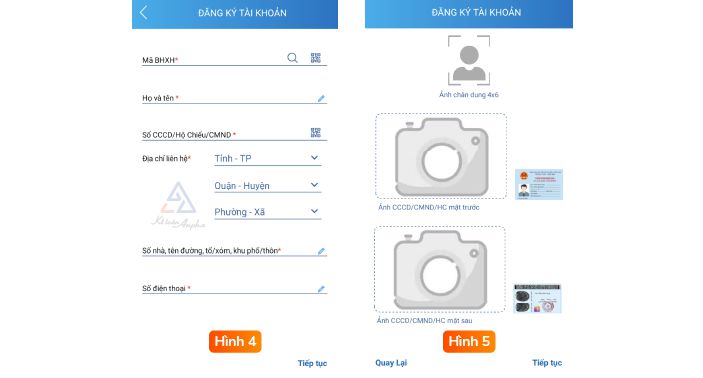
- At this step (as shown in image 4), you click on the boxes to fill in personal information as required, then select “Continue”;
Note : Each phone number can only register 1 social insurance number.
- Next, take a photo of both sides of your ID card/CCCD or upload it from your phone >> Select “Continue” (similar to image 5)
Step 3. Select the Social Security agency to receive the application and complete the VssID registration application
- After completing the above 4 steps, the phone interface will display as shown in figure 5 below;
- Then, you choose “Receiving Social Insurance Agency” >> Click on the box “Receive declaration via email” >> Enter registration email >> Click “Send” to complete the steps to register for a VssID account.
Step 4. Receive VssID account registration results
- After receiving valid documents, the Social Insurance system will issue and activate an account to use electronic Social Insurance transactions;
- The Social Insurance system will send a message “VssID login password” to the registered phone number.
Step 5. Login & check information on VssID
- Use the social insurance number and password you have just been given to access the VssID application to check your social insurance, health insurance, unemployment insurance participation information and related information.
Procedures for registering to receive support from the Unemployment Insurance Fund according to Resolution 116 and Decision 28 via VssID
The Unemployment Insurance Fund (UIF) was issued by the Government to support businesses and workers affected by the Covid-19 pandemic with many policies and support levels prescribed in Resolution 116/NQ-CP and Decision 28/2021/QD-TTg.
To receive unemployment insurance support, you can register according to the 4 steps below or refer to the article How to register to receive support from the Unemployment Insurance Fund according to Resolution 116 and Decision 28.
➤ 4 steps to register for unemployment insurance support using the VssID application
Step 1. Employees log in to their VssID application account and select “Joining Process”;
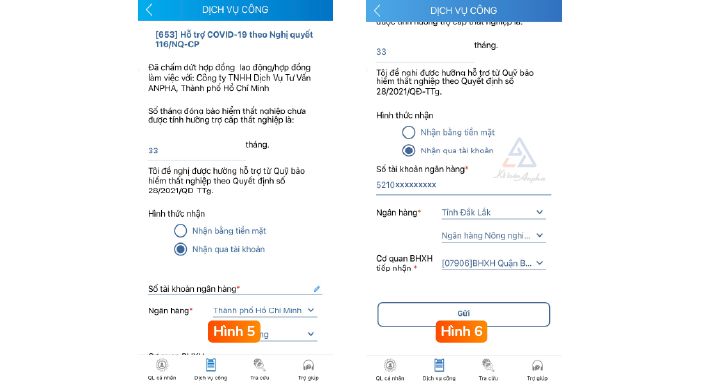
Step 2. Check the time of participation in social insurance (similar to image 3), then go to “Public services” on the application >> Select to create a profile “[653] Covid-19 support according to Resolution 116/NQ-CP” (as shown in image 4)
Step 3. Fill in the information as required in the file “[653] Covid-19 Support under Resolution 116/NQ-CP”
- Check the information again and select “Receive via account” >> Fill in the account number and receiving social insurance agency (similar to image 5);
- After filling in the information, select “Submit” to submit the application for unemployment insurance support (see image 6).
Step 4. Complete the registration procedure for unemployment insurance support.
- After submitting the information, the System will send an OTP code to your phone for confirmation. Enter the OTP code in the “Please enter OTP” box >> Then select “Confirm” (as shown in Figure 7);
- Immediately after sending the OTP code confirmation, the application interface will display the message “Successful application submission”, meaning you have completed the procedure for registering for unemployment insurance benefits according to regulations (similar to image 8).
Call us at 0978 578 866 (North), 0946 724 666 (Central) or 0978 578 866 (South) for support